Guide you step by step to How to install and run Backtrack on android. As the Backtrack is also available with ARM architecture which makes it possible to run Backtrack on an ARM machine such as mobiles or tablets.
Recently, We are discussed Install and Run BackTrack on Windows. Android is the best OS for penetration testing. It designed for digital forensics and penetration testing or hacking tool. It comes with many more updated tools. As the Backtrack is also available with ARM architecture which makes it possible to run Backtrack on an ARM machine such as mobiles or tablets.
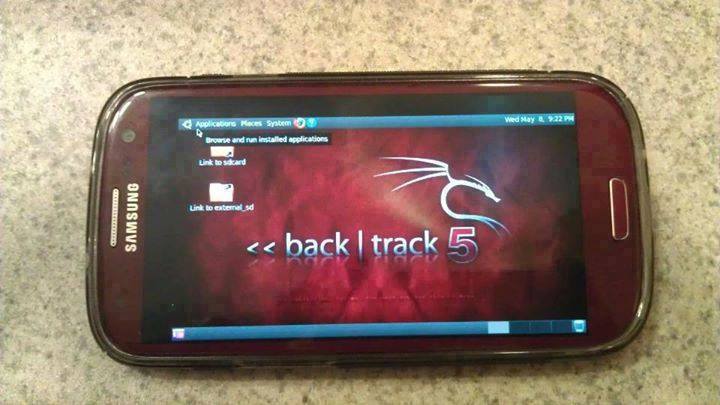
How To Install and Run Backtrack On AndroidRequirements
- A Rooted Device [ Root Simple Android Phone Without Pc ]
- Backtrack ARM [ Download ]
- BusyBox [ Download ]
- Android Terminal and Android VNC
- If you are using PC then you need 7zip for extraction otherwise you can use zarchiver on your android phone. [ Download ]
Step to Install and Run Backtrack On Android:
First of all extract the BT5-GNOME-ARM.7z. and copy the "BT5" folder and then put in your phone's root directory. Here mine phone is /sdcard. The root directory is different for different mobile devices.
- Now install all the above apps Busybox, Android Terminal, Android Vnc.
- After installing BusyBox application open it and wait until it finishes loading and then click on Smart install.
- Now open the android terminal and type the following command:
su cd /sdcard/BT5sh bootbtNOTE :- When you type su in terminal it will ask you for superuser request and you have to tap on Grant. - After this, type the following commands in terminal.
export USER=rootvncpasswd - After entering vncpasswd the terminal will ask you to enter the password. Enter the desired password and hit enter.
- Now type the following commands.
tightvncserver -geometry 1280×720 - The terminal emulator will create the localhost to connect it to VNC server. Now note the localhost port marked red below. Now minimize the terminal emulator.
- Open the Android VNC and type the following settings.
Nickname : BT5
Password : your password here which you entered in terminal (step no.6)
Address : localhost
Port : 5906
Password : your password here which you entered in terminal (step no.6)
Address : localhost
Port : 5906
NOTE: Make sure that your localhost's port matches with terminal's localhost. Here mine New 'X' desktop is localhost:6. You may be different. So, in VNC type Port 590X where the "X" is the localhost in the android terminal.
That's it now just tap on connect to run the Backtrack on your android. So in this way you successfully install and run backtrack 5 on android. If you face any problem feel free to discuss in below comments!
More articles
- Hack Tools Download
- Hacks And Tools
- Computer Hacker
- Hack Tools 2019
- Pentest Tools Review
- Game Hacking
- Blackhat Hacker Tools
- Hacker Tool Kit
- Black Hat Hacker Tools
- Hack Tool Apk No Root
- Hacking Tools For Pc
- Hacker Tools Software
- Hacking Tools For Windows 7
- Hacker Tools Free
- Hack Tool Apk
- Best Hacking Tools 2020
- New Hacker Tools
- Hacking Tools Kit
- Best Hacking Tools 2020
- Hacking Tools Pc
- Hacking Tools Windows 10
- Hack Tools For Mac
- Hacks And Tools
- Wifi Hacker Tools For Windows
- What Is Hacking Tools
- Black Hat Hacker Tools
- Android Hack Tools Github
- Hacking Tools For Kali Linux
- Hacking Tools Hardware
- Pentest Tools Download
- Hack Tools Online
- Pentest Reporting Tools
- Github Hacking Tools
- How To Hack
- Best Hacking Tools 2019
- Hacking Tools For Windows
- Pentest Tools Alternative
- Hacking Tools Github
- What Is Hacking Tools
- Hacking Tools Github
- Pentest Tools Website Vulnerability
- Hacker Tools For Mac
- Hack Tools For Games
- Hacking App
- Hack Tool Apk
- Hack Website Online Tool
- Hacking Tools Usb
- Tools Used For Hacking
- Hacker Tool Kit
- How To Install Pentest Tools In Ubuntu
- Hacking Tools For Mac
- Hack Tools Pc
- Nsa Hack Tools Download
- Pentest Tools Apk
No comments:
Post a Comment